Is AWS Actually Faster? Hosting Blog Images for Hacktober
Published:
By Andrew RutledgeIs AWS actually faster than my own host for blog images? I tested it with four free tools while trying to keep my PageSpeed score of 99
Why images
Every October, I give myself the same goal: take the spirit of Hacktober and spend at least 20 days of the month working on personal projects. This year is no different. The one thing holding me back from writing more often, and from developing this site more, is that I know my posts would be a lot better with images.
I'm not an expert web developer by any means. I've pieced together what knowledge I have through courses and tutorials, implementing things as I learned about them. That's been great, but delivering images properly is still a bit of a mystery to me.
My first foray into web development was a site built on WordPress. Several of my posts there had a handful of images, and I didn't know any better at the time. They were large and uncompressed, and they absolutely destroyed the load times. The pages sometimes took 20 seconds to load. I didn't want that to happen here, after coding this site by hand and really thinking through what happens behind the scenes. This site scores a 99 on PageSpeed, and that's become a point of pride I didn't want to let go of easily.
The plan
So I got to thinking: how do I host images without bogging down my load times again? I had a little AWS experience from a previous job, nothing too crazy, and I wanted to touch up those skills. So I decided to host my images in an S3 bucket and deliver them to my site through CloudFront. AWS is a huge company. It has to be faster than Hostinger's built-in hosting, right? I don't know much about Hostinger, but if they sell web hosting to the masses as cheaply as they do, I figured it probably wasn't as good as AWS. That might have been a wrong assumption, but that's how my train of thought went. After thinking about it some more, I decided I should put that to the test and get some actual data on it. What's the fun of a project without some data analytics?
The build
Building the S3 buckets and CloudFront wasn't too bad, though I definitely relied on AI to troubleshoot some little hiccups along the way. A few things I learned:
- The certificate for a custom domain has to be in US East 1 for CloudFront to use it. I put everything there to keep it simple.
- CloudFront now has a flat-rate free plan. I triple-checked that I was on it, because I didn't want a botnet loading my images a million times and leaving me with a huge bill. S3 storage is still billed separately, but at my scale that's pennies, and I have a $1 budget alarm.
- Hostinger didn't recognize .avif files for my self-hosted test copy, so I had to add a line to my .htaccess file telling the server what kind of file it was.
- There were silly errors too. Hostinger's DNS editor adds your domain to every record automatically. The name AWS gave me already ended in a dot, so I ended up with two dots in a row, and Hostinger rejected it. I had to troubleshoot that for way too long before I noticed the double dots.
Early on, I also found out my images had no Cache-Control header at all, so browsers were left guessing how long to keep them. I ended up learning a lot more about caching than I expected.
How I tested
I wanted this to be something anyone could replicate for their own website, so I only used free tools: PageSpeed Insights, WebPageTest, Pingdom, and my browser's DevTools.
PageSpeed didn't give me any issues. I'd used it before and gotten decent scores. It did show me that my mobile experience was being held back a lot, which was my first insight that I have a lot more optimizing to do.
WebPageTest came highly recommended, and I got four or five tests in before it locked me out and told me to sign up for a free account. The free account link turned out to be a free trial for a paid subscription, so I didn't go that route. Free, then not free, leaves a bad taste in my mouth, and I don't want to recommend a tool like that.
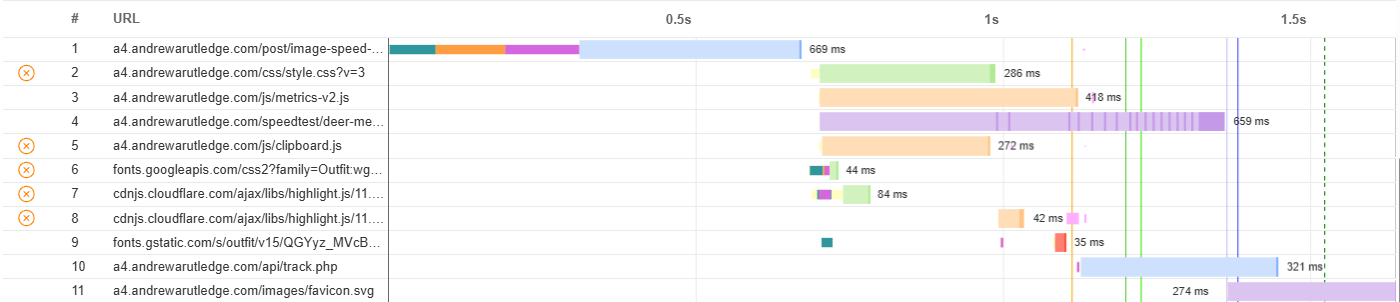
I did manage to grab two screenshots from my very first WebPageTest runs, so treat them as a worst case scenario. Each row is one file the page requested, and the image is row 7 on the AWS chart and row 4 on the Hostinger chart. The AWS image starts with teal, orange, and pink segments. Those are the DNS lookup, the connection, and the secure handshake, which the browser has to do first because the image lives on a different domain. That added about 50 ms. The Hostinger image goes straight to purple, the download itself, because it reuses the connection the page already opened. The two charts use different time scales, so compare how the image bars start, not how long they are.

After WebPageTest locked me out, I switched to Pingdom, which runs tests from cities around the world with no account. I ran cold loads from Washington D.C., London, and Tokyo. Then I ran cold and warm loads from my home using my browser's DevTools, limiting it to Fast 4G to mimic a phone, to see how much the browser cache changes image load times.
What happened
| Test | AWS | Hostinger | Note |
|---|---|---|---|
| Pingdom image wait, Washington D.C. | 114 ms | 75 ms | CloudFront cache miss every run |
| Pingdom image wait, London | 267 ms | 7 ms | CloudFront cache miss every run |
| Pingdom image wait, Tokyo | 497 ms | 3 ms | CloudFront cache miss every run |
| My browser, first visit (wait + download) | 376 ms | 1,131 ms | Both served from CDN cache |
| My browser, repeat visit | 0 ms | 0 ms | Browser cache |
PageSpeed called it a tie: 92 vs 91 on mobile and 99 vs 100 on desktop.
It really depends on the viewer. Pingdom says Hostinger was faster, and that gap grew with distance. My browser says AWS was faster for first-time visitors. For repeat visitors it was a tie, because both images came straight from the browser cache.
Pingdom turned out to be unreliable for this. Every CloudFront request in Pingdom was a cache miss, even on the fourth load from the same city, so CloudFront fetched the image from Virginia every time. My own browser got cache hits from the Dallas edge, so CloudFront's caching does work. My best guess is that Pingdom tells servers not to use their cached copies, but I couldn't confirm it. It just might not be the right tool for testing that part.
The verdict
In the grand scheme of things, it's close enough that where the images live won't affect load times enough to matter. My bigger issues can be fixed on my end: caching my pages, and having certain scripts wait instead of holding up the page. That's where my biggest loading hits came from, not the images at all.
So I chose to stick with AWS, mainly because it's much more portable. My images live behind their own images subdomain, so if I ever move my site away from Hostinger, the images don't have to move at all. And if AWS ever gives me trouble, I copy the files somewhere else and update one DNS record. If I hosted everything on Hostinger, I'd have to find a new home for every image and make sure every link still pointed to the right place.
What's next
That was my AWS refresher, and a crash course in the best way to deliver content. Now I have a nice list of back-end improvements to make this site even better, and that will be its own post. You'll probably also see a post about how I dictated this entire post through OpenWhispr and set it up to run locally on my PC. Being able to write an entire post just by speaking it is amazing. So stay tuned.